
How to Identify a Swollen Battery Safely
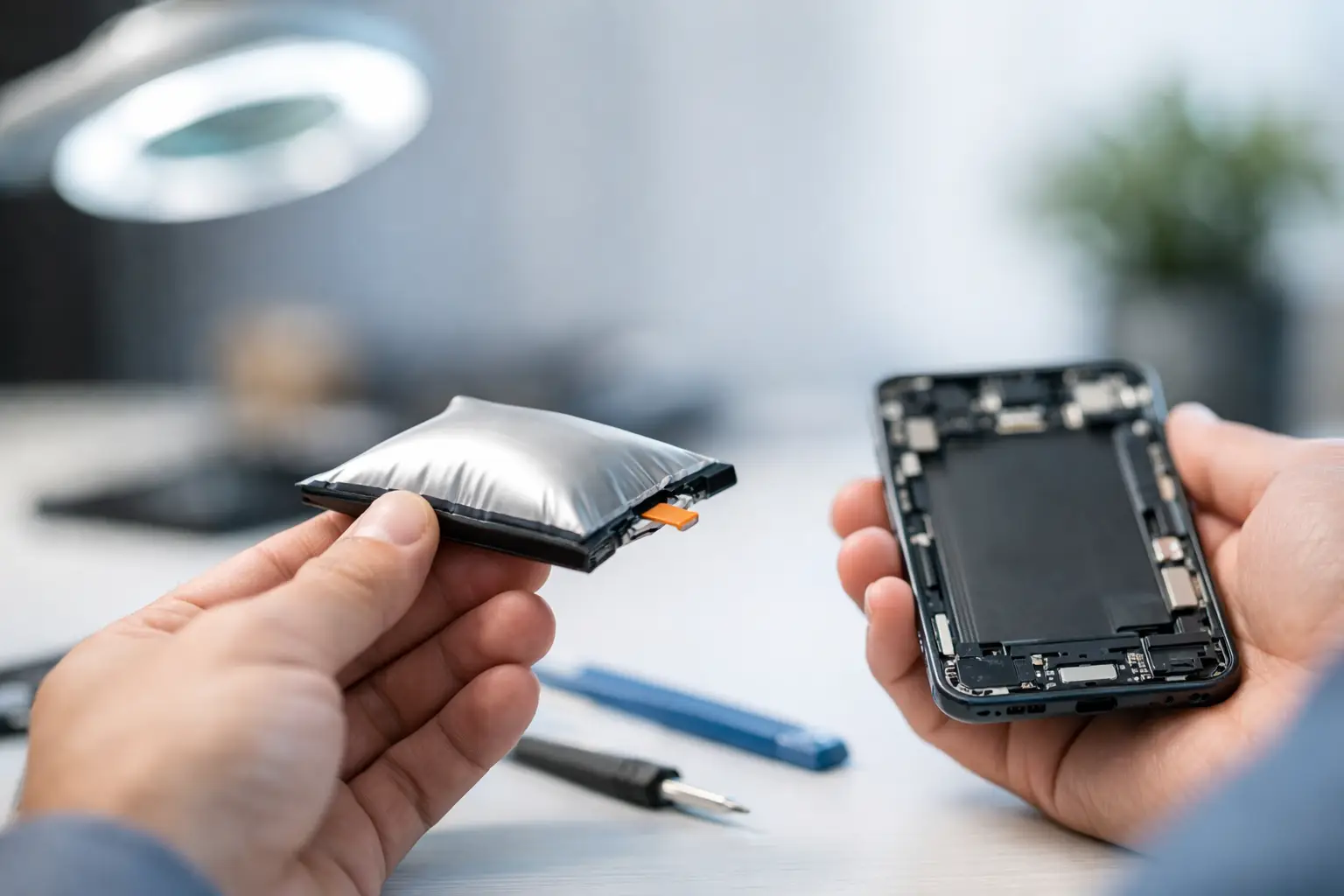
A phone screen lifting away from the frame is not always a screen problem. A laptop trackpad that suddenly feels stiff or a tablet back cover that will not sit flat can point to something more serious: a failing lithium-ion battery. Knowing how to identify a swollen battery early can prevent damage to your device and reduce the risk of overheating, smoke, or fire.
A swollen battery should never be treated as a cosmetic issue or something to monitor for a few more weeks. Stop using the device, do not charge it, and arrange for proper inspection and replacement.
What a swollen battery looks like
Lithium-ion batteries are built as flat cells that fit tightly inside phones, tablets, laptops, handheld gaming systems, and other electronics. When a cell fails, chemical reactions inside the battery can create gas. Since the battery is sealed, that gas has nowhere to go. The cell expands and begins pressing against the device housing, screen, trackpad, motherboard, or other internal parts.
In many newer devices, the battery is hidden behind a sealed back cover. You may not see the battery itself, but the pressure it creates is usually visible somewhere on the outside.
Look for these signs:
- A phone, tablet, or handheld console screen is separating from the frame, often along one edge or corner.
- The back glass or plastic cover is lifting, bowed outward, or no longer flush with the frame.
- A laptop trackpad is raised, hard to click, or clicking on its own because the battery is pushing upward from below.
- The bottom case of a laptop is bulging, rocking on a flat desk, or has gaps near the seams.
- A removable battery has a rounded, pillow-like shape instead of lying flat.
Do not press on a bulge to see whether it moves. A swollen cell can be damaged further by pressure, and a puncture may cause it to vent hot gas or ignite.
How to identify a swollen battery versus other damage
Not every separated screen or warped cover means the battery is swollen. A phone can open after a drop, a failed adhesive seal, or a bent frame. A laptop trackpad can also fail mechanically. The difference is usually the direction of the pressure and whether the device has changed shape without a clear impact.
Battery swelling often causes a gradual, even push from inside the device. For example, a phone screen may lift cleanly along the side closest to the battery compartment, while the display still works normally. On a laptop, the center area around the trackpad and palm rest may rise even though the outer case has not been dropped.
Heat and power behavior can support the diagnosis, but they are not required. A swollen battery may drain quickly, heat up during charging, shut down unexpectedly, or refuse to hold a charge. However, some swollen batteries still appear to charge and run normally. Normal battery life does not mean the battery is safe.
A repair technician can confirm the condition by opening the device safely and checking the battery cell, frame, connectors, and nearby components. This matters because swelling can crack screens, bend charging assemblies, damage trackpads, and place stress on motherboard components. Replacing only the visibly lifted part without addressing the battery will not solve the problem.
Common device-specific warning signs
On an iPhone or Android phone, screen separation is the most common clue. You may notice a thin gap between the display and frame, a corner that will not stay down, or light leaking from the edge of the screen. Do not try to glue the screen back into place. Adhesive can trap pressure inside the device and make later repair more difficult.
On a tablet, the display may lift from one side while the device becomes slightly curved when placed on a table. Because tablets use large flat battery cells, even mild swelling can push a screen up noticeably.
On a MacBook or Windows laptop, a raised trackpad is a major warning sign. If clicking feels unusually tight, the cursor behaves erratically, or the bottom case bows outward, shut the laptop down and avoid plugging it in. Continuing to type on a raised trackpad can press directly against the battery.
Gaming controllers, portable consoles, and older devices with removable battery packs can show the problem more clearly. If the battery door no longer closes or the battery pack looks rounded, remove power from the device if it can be done without forcing anything. Do not bend, squeeze, or attempt to flatten the pack.
What to do when you find battery swelling
The safest next step depends on the device condition. If it is operating normally and is not hot, smoking, or making hissing sounds, power it off. Unplug it from any charger and set it on a hard, nonflammable surface away from paper, bedding, carpet, direct sunlight, and children or pets.
Do not keep charging it to back up data. That is a common mistake. Charging adds stress to an already compromised cell. If your data is critical, let a qualified repair shop assess the device first. In some cases, data can be recovered after the battery has been safely disconnected or replaced.
Avoid putting a swollen device in a drawer, car, backpack, or airtight container. Heat buildup is a concern, especially in El Paso conditions where a parked vehicle can become extremely hot. A damaged lithium-ion battery should also never go into household trash or a standard recycling bin.
If the device is hot, smoking, leaking, or giving off a sweet or chemical odor, move people away from the area and contact local emergency services if there is an active fire or immediate danger. Do not handle a smoking or burning battery unless you can do so safely. These situations are uncommon, but they need to be treated seriously.
What not to do with a swollen battery
DIY battery replacement can be reasonable for some experienced owners working on devices designed for easy service. A swollen battery is different. Adhesive strips, tight enclosures, fragile screens, and nearby flex cables make removal riskier than a standard repair.
Do not puncture the battery with a screwdriver, pry tool, needle, or knife. Do not use heat to soften adhesive around a swollen cell. Do not clamp the device closed, sit a heavy object on it, or try to discharge the battery by leaving the device running. Each of these actions can turn a repairable issue into a safety event.
Also skip internet tricks that recommend freezing, flattening, or taping the battery. None of those methods fixes the internal chemical failure. A swollen battery needs replacement and proper recycling, not a workaround.
Why batteries swell in the first place
Age is one factor. Lithium-ion batteries wear out through normal charge cycles, and the risk rises as a device gets older. Excess heat, repeated fast charging, low-quality replacement batteries, physical damage, manufacturing defects, and liquid exposure can also contribute.
That does not mean you caused the problem. A well-maintained device can still develop battery swelling. The practical goal is to catch the warning signs early, before the battery damages the display, enclosure, or internal board.
A professional inspection is especially worthwhile if the device has liquid damage, a bent frame, charging trouble, or prior repair history. Those conditions can affect whether the battery alone needs replacement or whether other components need attention too.
If you see a lifted screen, raised trackpad, bowed case, or rounded battery pack, treat it as a reason to stop using the device today. EPElectrocenter offers walk-in battery evaluations and in-store repairs, so you can get a clear answer before a small battery issue turns into a damaged device.